
MOOIEV BLOG
AV Script Template: Plan Picture, Audio and Timing Together
Build a two-column audiovisual script with visual directions, audio text, shot references, row durations and a complete PDF preview.
In this article 6 sections
When a two-column AV script is useful
An AV script pairs the picture with what the audience hears. It is useful when a client, director and editor need to agree how narration, dialogue, graphics and images unfold over time. A conventional screenplay works well for dramatic scenes; a row-based audiovisual script makes an advertisement or explainer easier to review beat by beat.
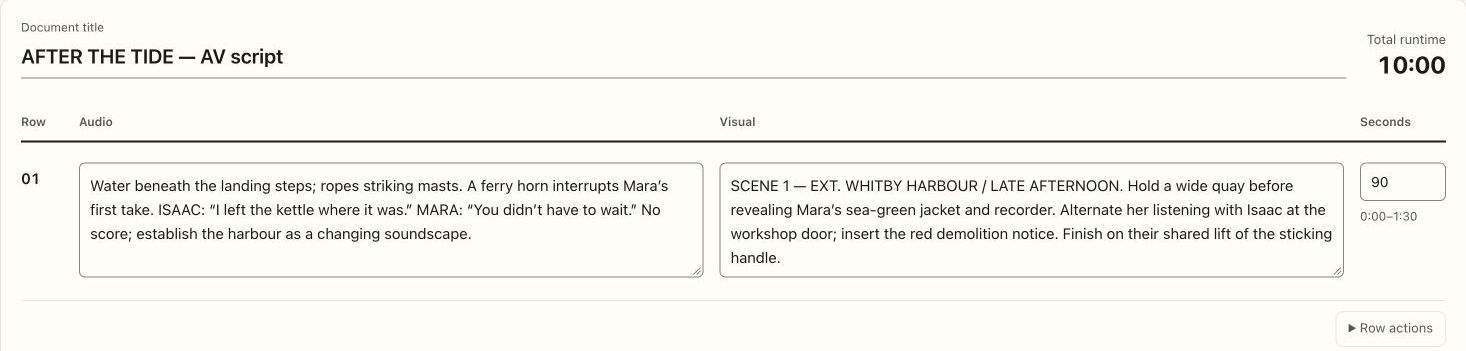
In Mooiev, each row contains visual and audio text, a duration and an optional shot reference. Write the sequence by hand first if that is the clearest route. The optional AI draft builder is a starting aid, not a requirement for making an AV script.
Start with a short, complete sequence
A useful row describes a single understandable beat. Separate a change of image or a new audio decision when it needs its own timing. The following fifteen-second example uses the sample film’s harbour setting; these durations are planning estimates, not a record of an edited film.
| Row | Picture | Sound | Seconds |
|---|---|---|---|
| 1 | Harbour wide; Mara enters | Water against stone | 6 |
| 2 | Close-up: recorder starts | Button click and harbour ambience | 4 |
| 3 | Mara reads the notice | Mara: “They never asked him.” | 5 |
Add references without losing the written brief
Use Shot references when a row should point to an existing project shot. A reference lets a reader connect “recorder insert” to the actual shot plan. Keep a useful written description as well: the script should explain the intended image even if a reference has not yet been added.
Distinguish audio directions from spoken words. “Harbour ambience continues under dialogue” and a line of voice-over ask different things of the sound plan. If a client changes the copy, review the intended read and duration instead of leaving the old timing untouched.
Reorder, duplicate and refine rows
Use row actions to move a beat up or down, duplicate it or remove it. Duplicate is useful when two treatments share the same structural beat but need different pictures. Review both copies so an old audio line is not mistaken for the approved version.
The editor shows each row’s time range and a running total. Change a duration and inspect the later ranges. Add pauses and transitions deliberately; a row total is a planning estimate, not a promise that performance or editing will land on exactly that length.
Review the sequence with the people making it
Read the audio aloud while following the visuals. Ask whether the image carries the intended information and whether the audience has enough time to understand it. Keep production questions with the relevant shot or project discussion rather than squeezing every note into the audio column.
A simple acceptance check is to ask a colleague to describe the sequence back to you. If they cannot tell which image accompanies a line, split or clarify the row. The purpose of the two-column layout is a shared understanding of time, picture and sound.
Save and inspect the complete PDF
Save the draft, open its preview and check long rows, references and page boundaries. The PDF should carry the full text needed for the handoff. Inspect a row containing several lines of audio so you are checking real wrapping behaviour, not only short placeholder text.
Use the approved AV script alongside the shot plan and relevant production documents. Keep later copy changes explicit so the director, editor and client work from the same sequence.