AI storyboard generator.
Plan the scene, frame by frame.
Generate AI storyboard frames from shot descriptions and visual references, review them beside your shot list, and keep the sequence connected to the screenplay and shooting plan.
Start free. Review suggestions before using them on set.
Choose the scene in the actual Mooiev storyboard.
Turn a script into a reviewed storyboard
Plan the coverage
Write or import a screenplay, choose a scene and create its shot list. Give each frame a size, camera angle and description of the action.
Set the visual references
Organize the characters, location, props and wardrobe in World and Scene Kit. Check the references before generating individual storyboard images.
Generate and review the sequence
Generate a frame for the shot, then compare it with the surrounding coverage. Check faces, screen direction, prop placement and light; revise frames that disagree.
Share the storyboard with the crew
Keep the reviewed frames beside their shooting notes. Use the storyboard document to discuss the coverage before arranging shots into shoot days.
A project requires an account. AI image generation has a monthly allowance; generated frames still need continuity review. See current plans and allowances.
Storyboard example: establish, detail, reveal
AFTER THE TIDE is Mooiev’s fictional sample film. These AI-assisted planning frames give three shots different jobs: establish the harbour, connect Mara to her recorder, and reveal the demolition deadline. Review geography, prop ownership and light before approving a sequence.
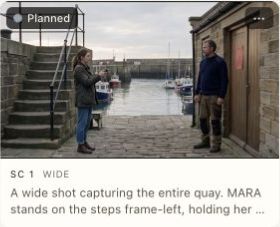
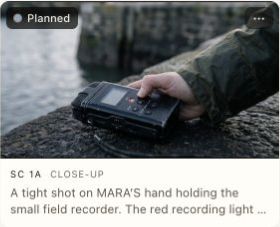
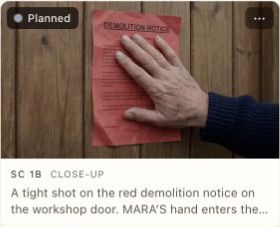
Read the six-shot storyboard example and continuity checks ↗
Use the free storyboard template: add images and export a 4-panel or 6-panel PDF ↗
Plan a sequence rather than one attractive picture
Establish the scene’s geography, then decide which closer shots earn a place in the coverage. Keep shot identifiers clear so a reference frame can be discussed with the director, cinematographer and first AD. An image is a planning reference, not a substitute for the scene or a guarantee of the finished film.
Check continuity across the scene
When using generated references, review faces, wardrobe, props, light and spatial relationships across the whole sequence. Revise frames that contradict the script or make the blocking unclear. AI generation is an optional aid with usage limits; visual consistency still needs human review.
Questions about storyboards
Are these screens from the actual Mooiev application?
Yes. The demonstration records the original storyboard workflow using the fictional AFTER THE TIDE sample project.
Does an AI frame guarantee continuity?
No. Generated references must be checked across the scene. Faces, clothing, prop positions and lighting can need correction before the frame is useful to a crew.