AV SCRIPT / PICTURE & SOUND
AV scripts. Picture and sound, together.
Plan what happens on screen beside the words, sounds and timing that give it meaning.
Project work requires an account. Explore public examples and free tools before starting.
01 / THE WORKFLOW
Use the format that makes the sequence clear
In a screenplay, action and dialogue describe a dramatic scene. In an AV script, parallel visual and audio columns make a demonstration, advertisement or narrated video easier to review. A row can describe a product close-up, its voiceover and its intended duration.
Start by writing the message in plain language. Divide the piece into beats and decide what the viewer must understand in each one before adding camera detail.
02 / THE WORKFLOW
Give every beat a timing target
Include openings, pauses, visual-only moments and the ending when planning runtime. A voiceover reading estimate does not include every action the viewer needs to see. Rehearse and revise the sequence against the intended delivery.
The worked product example uses six beats that total 30 seconds. It states the visual, audio and shot reference for each beat, so the shot list can be reviewed against the script.
03 / THE WORKFLOW
Keep the writing connected to the job
Carry the shot identifiers into the coverage plan, discuss product claims with the approval owner and keep the client brief with the project. Read the actual exported document before sending it.
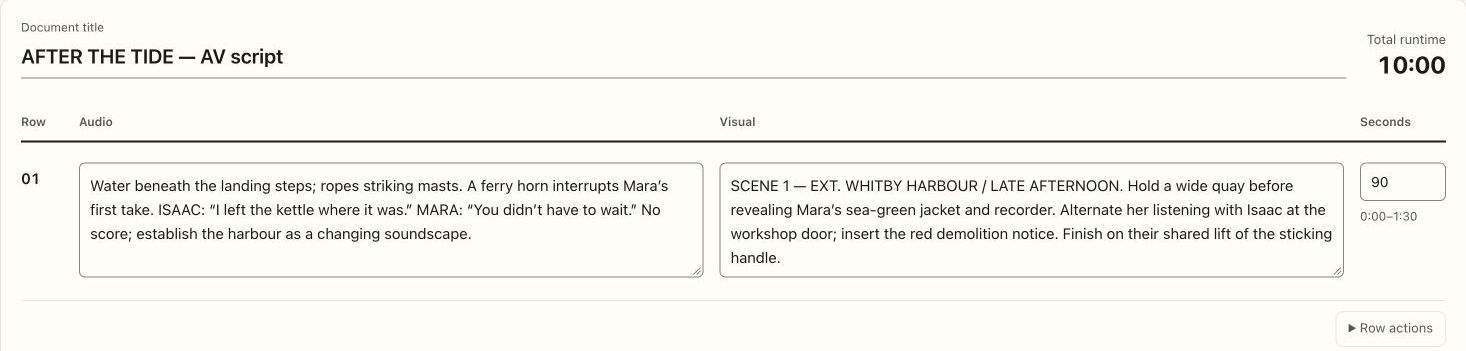
The sample AV script below comes from the fictional AFTER THE TIDE film. The product and YouTube examples are separate authored planning exercises, not recordings of client jobs.
Bring the plan and the people together.
Start with a project, or inspect a useful free resource first.